
MyNovant
Novant HealthMedical
4.3304.00 Reviews
- Version
- 7.2.0
- Installs
- 100.00K
- Age Rating
- Everyone
Screenshots
Our Review of MyNovant
 Analysis by Appyee
Managing healthcare is rarely difficult because of one big task. It is difficult because small tasks arrive at inconvenient times: checking whether a test result is ready, finding an appointment, remembering what to ask at a visit, or staying in touch with a care team while away from home. MyNovant, the medical app from Novant Health, is designed around those moments. I found its value less in novelty and more in bringing several patient-management jobs into one mobile place.
That focus makes it a practical choice for people who already receive care through Novant Health. It is free, rated for Everyone, and its current version is 7.2.0, so the barrier to trying it is low for people using a compatible device. The app has reached over 100 thousand installs and holds a 4.3 average from around 670 ratings, which suggests a generally positive reception without making it a universal fit.
How MyNovant feels when healthcare depends on a connection
The first thing I noticed is that MyNovant is fundamentally a connected healthcare tool. Its useful moments depend on reaching current information from Novant Health rather than simply opening a static reference guide. That matters when I am checking a newly posted test result, looking for an appointment, or trying to stay connected with care services. A strong connection turns those tasks into quick checks; a weak one can make even a simple request feel uncertain.
This is different from a health journal or medication reminder that can remain useful with information stored on the phone. MyNovant is closer to a digital doorway into a provider relationship. Its purpose is to help me interact with care that exists elsewhere, so the quality of the experience is tied to both the app and the network path between my phone and Novant Health.
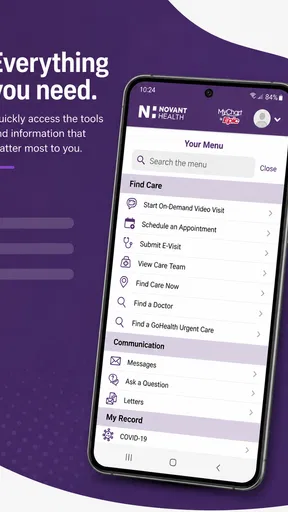
That distinction is important before downloading it. If I want general medical education, symptom explanations, exercise tracking, or a broad health dashboard, this is not the right category of app. MyNovant is more focused: it helps patients see test results, make appointments, and maintain contact with their healthcare organization. Its strongest feature is the connection to care, not a collection of standalone wellness tools.
Test results are most useful when timing matters
Checking test results on a phone can remove an unnecessary call or a wait for a paper document. In an everyday situation, I might be commuting home, receive a notification that something is available, and use the app to review it before deciding whether I need to write down a question for my next conversation with a clinician. That does not replace professional interpretation, but it can help me notice that I should follow up while the question is still fresh.
The network-dependent nature of this workflow creates a useful habit: I would avoid treating the app as the only place where I keep important health information. When a result matters, I would note the date, the name of the test, and any question I want answered. That small backup makes the app more useful because it turns a quick mobile check into a prepared conversation rather than a passive glance.
There is also a trade-off between speed and context. A result viewed on a phone may be convenient, but a smaller screen is not always the best setting for understanding complicated medical information. I prefer using the app to confirm that information is available and to prepare questions, then using the appropriate clinical channel when I need explanation. The app supports that process; it should not be mistaken for the explanation itself.
Appointments on the move
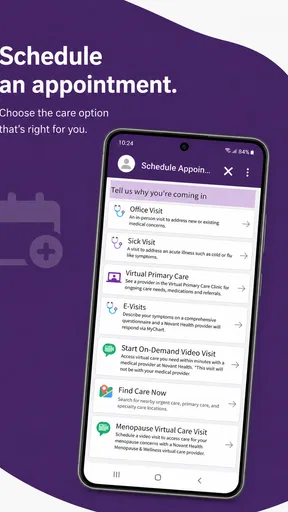
Appointment scheduling is another area where a connected app can be more convenient than the usual alternatives. Calling an office may require waiting, working around office hours, or repeating details that are already associated with my patient relationship. MyNovant gives the process a mobile starting point, which is especially helpful when I remember a scheduling task outside normal routines.
Still, I would not assume that every scheduling situation is equally suitable for the app. A straightforward appointment request is a good match for self-service. A complicated change involving several visits, a special requirement, or uncertainty about which department to choose may be better handled by speaking with staff. The app can reduce friction, but it does not eliminate the value of human guidance when the request is unusual.
A practical tip is to prepare before opening the scheduling flow. I would have my preferred days, time constraints, and the reason for the visit in mind. That is particularly helpful on a phone, where switching between a calendar and the healthcare app can be awkward. This is a small workflow improvement, but it makes the mobile experience feel less like browsing and more like completing a task.
Mobile contexts where the app earns its place
MyNovant makes the most sense in short, purposeful sessions. I can imagine using it in a waiting room to check whether an appointment detail is correct, at home after receiving a test result, or during a break when I need to begin arranging care. These are situations where the phone is already nearby and opening an app is easier than searching for a number or a document.
It is also useful for people who coordinate care around a busy household. A parent, partner, or caregiver may need to keep track of a scheduling task or remember that a result needs discussion. The app does not turn that responsibility into a shared family system, but it can make the patient’s own access more immediate. I would be careful with shared phones, unlocked screens, and public spaces, because convenience should not outweigh privacy.
Travel is a more mixed case. Mobile access can be valuable when I am away from my usual routine, but I would not plan around the assumption that every healthcare action will work smoothly from an unfamiliar network. Before a trip, I would save essential appointment details and make sure I know how to contact the relevant care office through ordinary means. That preparation protects me if connectivity is poor or if a request needs personal assistance.
The app is less compelling for someone who rarely uses mobile services or prefers to handle all healthcare matters by phone. Installing it does not automatically improve a workflow that already works well. Its advantage appears when I want quick access between conversations with the provider, not when I am looking for a complete replacement for every traditional channel.
What happens when a connection fails
Connected healthcare apps need a sensible recovery plan, and this is where my expectations become more cautious. If a page takes too long to load or an action does not complete, I would first avoid tapping repeatedly. With appointment requests or other account actions, repeated attempts can create confusion about whether the first request went through. I would wait, check the visible status, and then use the relevant Novant Health contact route if the outcome remains unclear.
This is one of the non-obvious trade-offs of convenience: a digital action can feel finished before I have enough confirmation to trust it. For that reason, I would capture important appointment information in my calendar only after seeing a clear confirmation. I would also keep any reference details shown by the app until I know the task is complete.
When a result or account page will not open, the best recovery sequence is simple. I would check whether other internet-dependent apps are working, move to a more reliable connection if one is available, close and reopen MyNovant, and try again later. If the issue affects an urgent medical concern, I would not wait for the app to recover; I would use the appropriate clinical or emergency channel instead. A patient portal is a convenience layer, not an emergency service.
Updates can matter as well. MyNovant was released on November 19, 2020, and the current version is 7.2.0. I see that as a reminder to keep the app reasonably current rather than judging an older installation forever. Updates can change how a connected service behaves, so after an update I would briefly check that I can still sign in and reach the areas I use most before I need them.
Using it carefully on mobile data
For most people, occasional portal tasks are unlikely to be the same kind of data burden as streaming video, but I still prefer using a stable connection for important healthcare actions. The reason is not only data consumption. A reliable connection reduces the chance that a page stops halfway through loading or that I am left unsure whether an appointment action completed.
On a limited mobile plan, I would reserve MyNovant for focused checks rather than repeatedly refreshing a result or scheduling screen. I would open it when I know what I need to do, complete that task, and close it. At home or on trusted Wi-Fi, I would handle longer account reviews when practical. This approach is less about measuring exact usage and more about avoiding unnecessary retries.
Public Wi-Fi deserves extra care. I would not use an unfamiliar network casually for private healthcare activity if I could wait for a trusted connection. If I must use the app away from home, I would pay attention to the phone’s lock settings, avoid leaving the account open, and sign out or secure the device when finished. These are sensible habits for any medical portal, but they matter more when the app brings personal results and appointments into a portable device.
Another useful habit is to separate “checking” from “acting.” Looking to see whether information is available is one task; scheduling or changing something is another. When the connection is unstable, I would postpone actions that need definite confirmation. That distinction helps prevent a weak signal from turning a minor inconvenience into a scheduling problem.
Where it beats ordinary alternatives—and where it does not
Compared with calling a provider for every routine question about results or appointments, MyNovant can be more convenient because it gives me a self-service route at the moment I think of the task. Compared with a general health app, it is more relevant to Novant Health patients because its purpose is tied to that healthcare relationship. Compared with keeping screenshots or notes alone, it offers a more direct way to return to current account information.
Those comparisons have limits. A phone call remains better when I need clarification, when a scheduling request is complicated, or when I am unsure which service is appropriate. A general wellness app may be better for tracking habits or fitness. A paper calendar may be better as a backup for appointment times because it does not depend on a login or connection. I would use MyNovant alongside those tools rather than expecting it to replace all of them.
The app is also not equally valuable to every patient. Someone outside the Novant Health system has little reason to install it. Someone who needs immediate medical advice should choose the proper clinical contact instead of waiting for a portal workflow. And someone who wants extensive personal health analytics may find the experience too focused on provider communication. Knowing these boundaries makes the recommendation more honest.
Who should install MyNovant?
I would recommend it to Novant Health patients who want a convenient way to check test results, begin appointment tasks, and stay connected from a phone. It is particularly suitable for people who are comfortable with self-service, regularly manage care between visits, or dislike making a call for every routine administrative question.
I would also recommend it to someone who wants to prepare better for appointments. A quick result check can prompt a written question, while appointment access can help keep scheduling tasks from being forgotten. The best use is not endlessly browsing the app; it is using it as a small bridge between real healthcare interactions.
I would skip it if I am not a Novant Health patient, if I need a general wellness tracker, or if I strongly prefer phone-based support and rarely use mobile account services. I would also avoid relying on it as my only source of urgent information. Those are not flaws so much as signs that the app serves a specific purpose rather than trying to be every kind of medical tool.
My final view of the connected experience
MyNovant is a focused medical app from Novant Health that makes provider-related tasks easier to reach from a mobile device. Its free price and Everyone age rating make it approachable, while its 4.3 average and over 100 thousand installs show that many patients find the basic idea useful. What matters more to me, though, is whether its connected design fits the way I handle care.
In my experience of the workflow, the app is at its best when I have a clear task and a dependable connection: check a result, start arranging an appointment, or return to my healthcare relationship without searching through old messages. Its weakest moments are the predictable ones for any connected portal: uncertain loading, the need to verify whether an action completed, and the temptation to use it when a direct conversation would be wiser.
My recommendation is positive, with one condition: treat MyNovant as a convenient connection to Novant Health, not as a replacement for clinical judgment or backup planning. If that matches what I need, it can save time and make routine healthcare management feel less scattered. If I want offline-first tools, broad wellness tracking, or urgent medical help, I would choose a different solution and keep this app in its proper role.
Verdict
Strengths of MyNovant
- Easy access to appointments, test results, and medical records in one place.
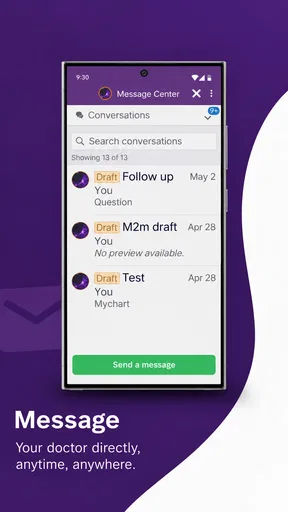
- Secure messaging makes it convenient to contact your Novant care team.
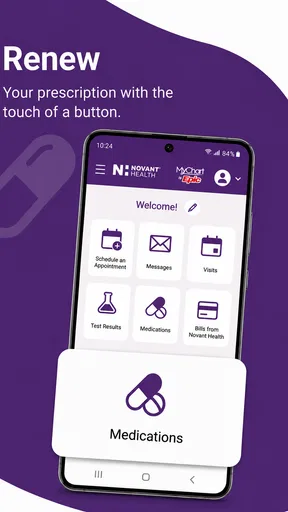
- Prescription details and refill information are easy to review.
- Appointment reminders can help reduce missed visits.
- Supports virtual care options when eligible for online consultations.
Limitations of MyNovant
- Some features may only work for patients within the Novant Health network.
- Account setup can require identity verification and personal health details.
- Appointment availability depends on the selected provider and location.
- Notifications may become excessive if several healthcare services are enabled.
- Certain records or results may appear with a delay after clinical visits.
Similar Picks in This Category
View All
WebMD: Symptom Checker
WebMD, LLC4.1

Microphone Amplifier
DOSA Apps4.2

Anatomy Learning - 3D Anatomy
3D Medical OU4.5

Period Tracker and Calendar
SimpleInnovation4.9

GoodRx: Prescription Coupons
GoodRx4.8

CVS Health
CVS Pharmacy4.5
Frequently Asked Questions
What is MyNovant, and what can I use it for?
MyNovant is the official patient app for Novant Health, designed to help users manage many healthcare tasks from a mobile device. Depending on your Novant Health services and account settings, you can review medical information, schedule or request appointments, communicate with care teams, view test results, manage prescriptions, check billing details, and access health-related resources in one place.
How do I sign in to MyNovant or create an account?
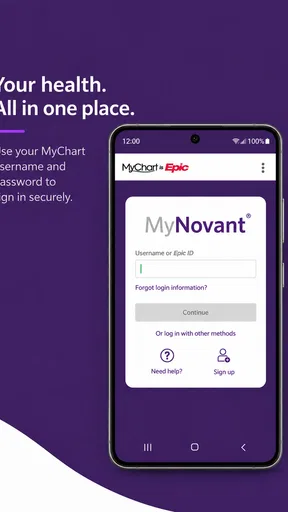
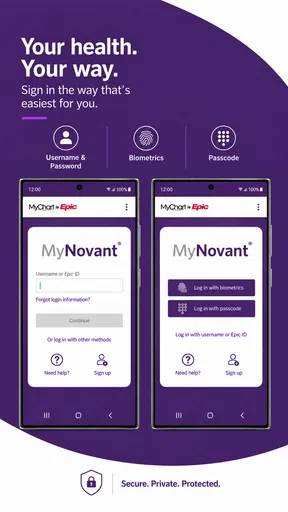
To use MyNovant, you generally need a Novant Health MyChart account or eligible patient access. New users can usually sign up through the app or the Novant Health website using the requested identity-verification details, such as an activation code or personal information. Existing users can sign in with their MyChart credentials. Keep your login information private and enable device security whenever possible.
Can I schedule appointments and communicate with my Novant Health provider?
MyNovant may allow you to schedule, reschedule, or cancel certain appointments, although availability depends on the department, provider, appointment type, and your patient status. The app can also support secure messaging with participating care teams, letting you ask non-urgent questions and receive replies. It is not intended for emergencies; call emergency services or seek immediate medical care when necessary.
Can MyNovant show test results, medications, and medical records?
The app can provide access to portions of your electronic health record, including available laboratory results, visit summaries, immunization information, medications, allergies, and clinical notes. Information may not appear immediately because some results require review or processing. The exact records displayed can vary by facility, provider, age, privacy settings, and applicable healthcare regulations.
Is MyNovant free, and is my health information secure?
MyNovant is generally available at no additional charge to eligible Novant Health patients, although normal mobile data or internet charges may apply. The app uses account authentication and security measures intended to protect personal health information, but users should still install updates, use a strong password, avoid public devices, and lock their phone. Always review permissions and sign out if sharing a device.
